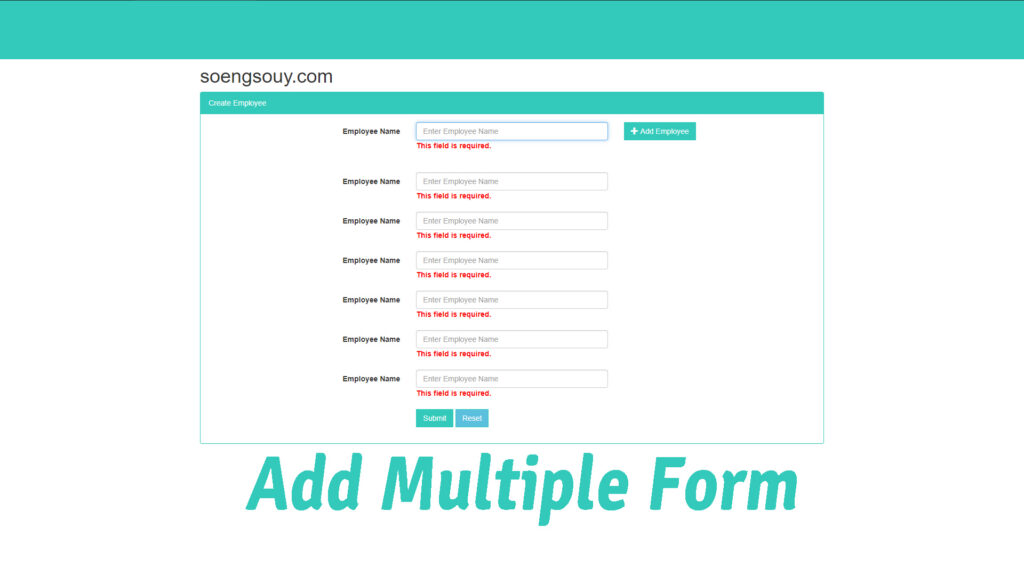
Step 1: Dynamic HTML Form Structure with Add/Remove and Validation
<!DOCTYPE html>
<html lang="en">
<head>
    <meta name="viewport" content="width=device-width, initial-scale=1" />
    <title>Dynamic Form - Add/Remove Inputs</title>

    <!-- Bootstrap for styling -->
    <link rel="stylesheet" href="https://maxcdn.bootstrapcdn.com/bootstrap/3.3.5/css/bootstrap.min.css">

    <!-- jQuery and Bootstrap JS -->
    <script src="https://ajax.googleapis.com/ajax/libs/jquery/1.11.3/jquery.min.js"></script>
    <script src="https://cdnjs.cloudflare.com/ajax/libs/twitter-bootstrap/3.3.5/js/bootstrap.min.js"></script>

    <!-- jQuery Validate plugin -->
    <script src="https://cdnjs.cloudflare.com/ajax/libs/jquery-validate/1.19.5/jquery.validate.min.js"></script>

    <style>
        .error {
            color: red;
        }
        .panel-primary {
            border-color: #33cabb;
        }
        .btn-primary {
            background-color: #33cabb;
            border-color: #33cabb;
        }
        .panel-primary > .panel-heading {
            background-color: #33cabb;
            border-color: #33cabb;
            color: #fff;
        }
    </style>
</head>
<body>
<div class="container">
    <h2 class="text-center">Dynamic Form - Add/Remove Input Fields</h2>
    <div class="panel panel-primary">
        <div class="panel-heading">Create Employee Form</div>
        <div class="panel-body">
            <form id="myForm" class="form-horizontal">
                <!-- Main Employee Input -->
                <div class="form-group">
                    <label class="col-md-4 control-label">Employee Name</label>
                    <div class="col-md-4">
                        <input type="text" name="Name" id="Name" placeholder="Enter Employee Name" class="form-control input-md" required>
                    </div>
                    <div class="col-md-2">
                        <button type="button" id="btnAdd" class="btn btn-primary">
                            <i class="glyphicon glyphicon-plus"></i> Add Employee
                        </button>
                    </div>
                </div>

                <!-- Placeholder for dynamic fields -->
                <div id="employeeList"></div>

                <!-- Submit & Reset Buttons -->
                <div class="form-group">
                    <div class="col-md-offset-4 col-md-8">
                        <button type="submit" id="btnSubmit" class="btn btn-primary">Submit</button>
                        <button type="reset" id="btnReset" class="btn btn-info">Reset</button>
                    </div>
                </div>
            </form>
        </div>
    </div>
</div>

<script>
$(document).ready(function () {
    let counter = 1;

    // Add new input field
    $('#btnAdd').click(function () {
        const newField = `
            <div class="form-group" id="emp${counter}">
                <label class="col-md-4 control-label">Employee ${counter} Name</label>
                <div class="col-md-4">
                    <input type="text" name="empName-${counter}" placeholder="Enter Employee Name" class="form-control input-md dynamicField" required>
                </div>
                <div class="col-md-2">
                    <button type="button" class="btn btn-danger removeField" data-id="emp${counter}">
                        <i class="glyphicon glyphicon-remove"></i> Remove
                    </button>
                </div>
            </div>
        `;
        $('#employeeList').append(newField);
        counter++;
    });

    // Remove input field
    $(document).on('click', '.removeField', function () {
        const id = $(this).data('id');
        $('#' + id).remove();
    });

    // Form validation
    $('#myForm').validate();
});
</script>
</body>
</html>
Features Overview
- Add Dynamic Fields: Each added field is numbered and comes with a “Remove” button.
- Remove Fields: Clicking “Remove” deletes the associated field.
- jQuery Validation: Ensures required fields are filled (including dynamically added ones).
- Bootstrap Styling: Clean layout and responsive behavior.